 Render a House
Free North Arrow PNG, SVG & CAD Downloads
Choose from ten north arrow styles: a classic needle, circle and N, minimalist line, compass rose, half-filled triangle, target, boxed arrow, chevron, survey cross and split diamond. Each has transparent black and white PNGs as well as editable vectors.
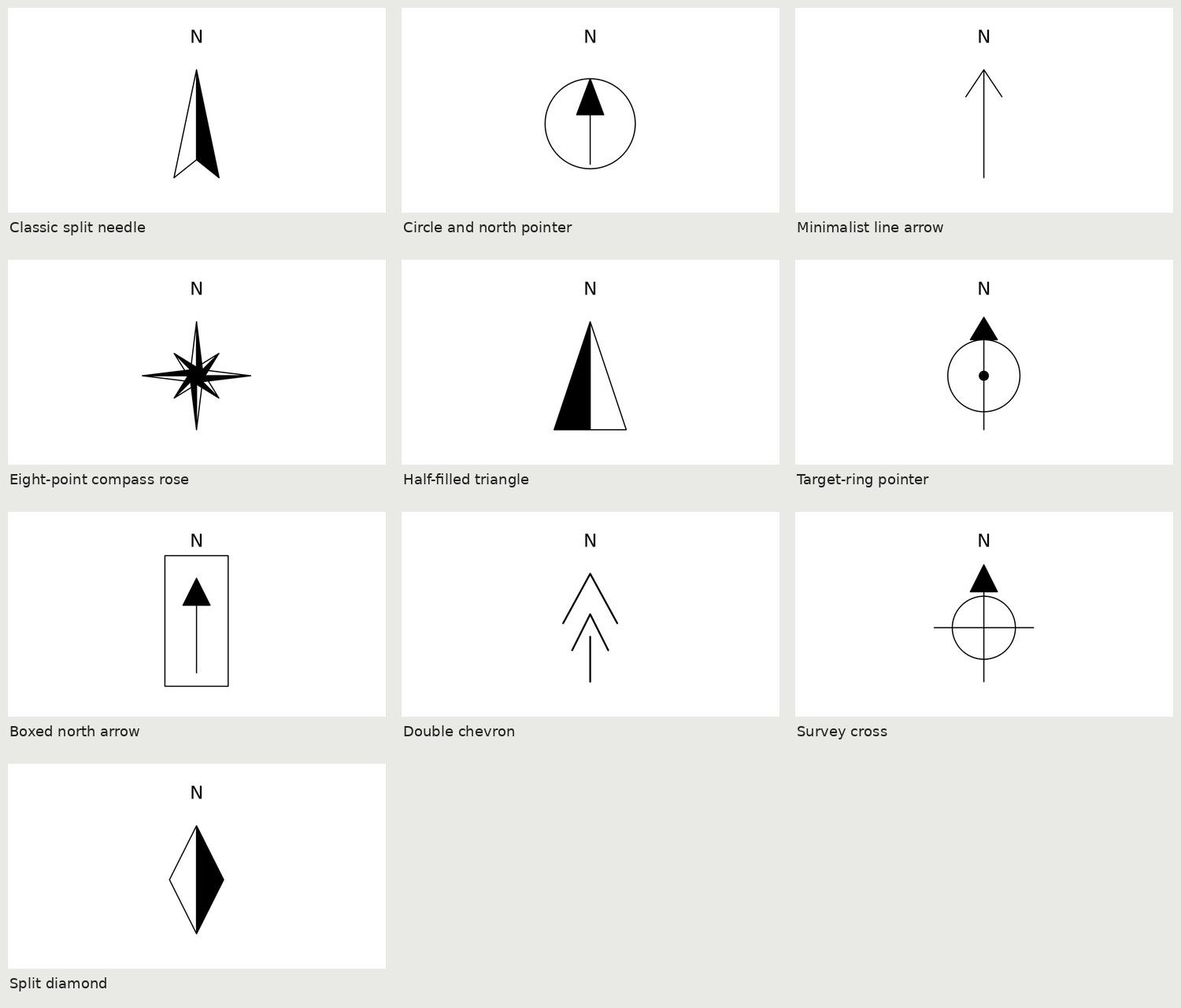
North arrows: previews and downloads
Download North arrows ZIP · 510,469 bytes. Packs include source files, previews, usage notes and CC0 terms. No signup.
Each item ZIP contains its available source formats and PNGs. Extract the ZIP before opening DXF, SVG, PDF or PAT files; previews remain WebP.
Classic split needle

Original schematic north arrow; up is north. Insert at paper size and rotate to the project north convention. Not a geographic survey instrument.
Download Classic split needle ZIP · 48,249 bytesPaper canvas: 32 × 42 mm.
| File | Size / pixels |
|---|---|
| DXF · R2013 · mm (inside ZIP) | 55,904 bytes |
| Editable SVG (inside ZIP) | 517 bytes |
| Print-size PDF (inside ZIP) | 3,388 bytes |
| Transparent PNG · black (inside ZIP) | 20,364 bytes · 762 × 1000 px |
| Transparent PNG · white (inside ZIP) | 22,365 bytes · 762 × 1000 px |
Circle and north pointer

Original schematic north arrow; up is north. Insert at paper size and rotate to the project north convention. Not a geographic survey instrument.
Download Circle and north pointer ZIP · 59,176 bytesPaper canvas: 32 × 42 mm.
| File | Size / pixels |
|---|---|
| DXF · R2013 · mm (inside ZIP) | 55,977 bytes |
| Editable SVG (inside ZIP) | 603 bytes |
| Print-size PDF (inside ZIP) | 3,569 bytes |
| Transparent PNG · black (inside ZIP) | 24,441 bytes · 762 × 1000 px |
| Transparent PNG · white (inside ZIP) | 27,007 bytes · 762 × 1000 px |
Minimalist line arrow

Original schematic north arrow; up is north. Insert at paper size and rotate to the project north convention. Not a geographic survey instrument.
Download Minimalist line arrow ZIP · 23,708 bytesPaper canvas: 32 × 42 mm.
| File | Size / pixels |
|---|---|
| DXF · R2013 · mm (inside ZIP) | 55,619 bytes |
| Editable SVG (inside ZIP) | 506 bytes |
| Print-size PDF (inside ZIP) | 3,378 bytes |
| Transparent PNG · black (inside ZIP) | 9,229 bytes · 762 × 1000 px |
| Transparent PNG · white (inside ZIP) | 9,501 bytes · 762 × 1000 px |
Eight-point compass rose

Original schematic north arrow; up is north. Insert at paper size and rotate to the project north convention. Not a geographic survey instrument.
Download Eight-point compass rose ZIP · 62,479 bytesPaper canvas: 32 × 42 mm.
| File | Size / pixels |
|---|---|
| DXF · R2013 · mm (inside ZIP) | 60,823 bytes |
| Editable SVG (inside ZIP) | 2,695 bytes |
| Print-size PDF (inside ZIP) | 3,608 bytes |
| Transparent PNG · black (inside ZIP) | 25,535 bytes · 762 × 1000 px |
| Transparent PNG · white (inside ZIP) | 29,429 bytes · 762 × 1000 px |
Half-filled triangle

Original schematic north arrow; up is north. Insert at paper size and rotate to the project north convention. Not a geographic survey instrument.
Download Half-filled triangle ZIP · 31,906 bytesPaper canvas: 32 × 42 mm.
| File | Size / pixels |
|---|---|
| DXF · R2013 · mm (inside ZIP) | 55,894 bytes |
| Editable SVG (inside ZIP) | 515 bytes |
| Print-size PDF (inside ZIP) | 3,382 bytes |
| Transparent PNG · black (inside ZIP) | 13,360 bytes · 762 × 1000 px |
| Transparent PNG · white (inside ZIP) | 13,275 bytes · 762 × 1000 px |
Target-ring pointer

Original schematic north arrow; up is north. Insert at paper size and rotate to the project north convention. Not a geographic survey instrument.
Download Target-ring pointer ZIP · 56,156 bytesPaper canvas: 32 × 42 mm.
| File | Size / pixels |
|---|---|
| DXF · R2013 · mm (inside ZIP) | 59,072 bytes |
| Editable SVG (inside ZIP) | 691 bytes |
| Print-size PDF (inside ZIP) | 3,736 bytes |
| Transparent PNG · black (inside ZIP) | 22,868 bytes · 762 × 1000 px |
| Transparent PNG · white (inside ZIP) | 25,027 bytes · 762 × 1000 px |
Boxed north arrow
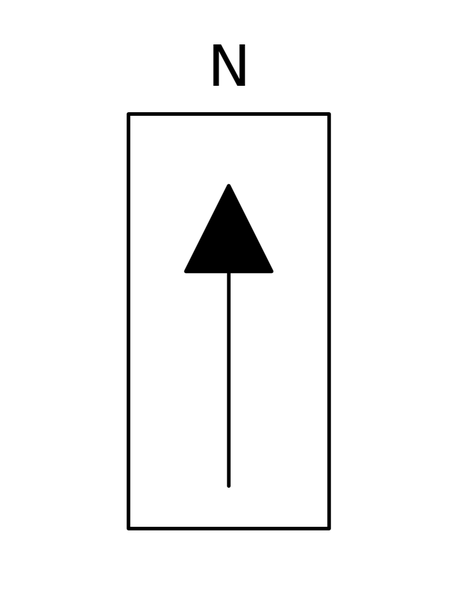
Original schematic north arrow; up is north. Insert at paper size and rotate to the project north convention. Not a geographic survey instrument.
Download Boxed north arrow ZIP · 20,603 bytesPaper canvas: 32 × 42 mm.
| File | Size / pixels |
|---|---|
| DXF · R2013 · mm (inside ZIP) | 56,016 bytes |
| Editable SVG (inside ZIP) | 603 bytes |
| Print-size PDF (inside ZIP) | 3,423 bytes |
| Transparent PNG · black (inside ZIP) | 7,811 bytes · 762 × 1000 px |
| Transparent PNG · white (inside ZIP) | 7,834 bytes · 762 × 1000 px |
Double chevron

Original schematic north arrow; up is north. Insert at paper size and rotate to the project north convention. Not a geographic survey instrument.
Download Double chevron ZIP · 42,965 bytesPaper canvas: 32 × 42 mm.
| File | Size / pixels |
|---|---|
| DXF · R2013 · mm (inside ZIP) | 55,757 bytes |
| Editable SVG (inside ZIP) | 589 bytes |
| Print-size PDF (inside ZIP) | 3,403 bytes |
| Transparent PNG · black (inside ZIP) | 17,680 bytes · 762 × 1000 px |
| Transparent PNG · white (inside ZIP) | 19,049 bytes · 762 × 1000 px |
Survey cross

Original schematic north arrow; up is north. Insert at paper size and rotate to the project north convention. Not a geographic survey instrument.
Download Survey cross ZIP · 48,476 bytesPaper canvas: 32 × 42 mm.
| File | Size / pixels |
|---|---|
| DXF · R2013 · mm (inside ZIP) | 56,123 bytes |
| Editable SVG (inside ZIP) | 676 bytes |
| Print-size PDF (inside ZIP) | 3,576 bytes |
| Transparent PNG · black (inside ZIP) | 19,812 bytes · 762 × 1000 px |
| Transparent PNG · white (inside ZIP) | 21,538 bytes · 762 × 1000 px |
Split diamond

Original schematic north arrow; up is north. Insert at paper size and rotate to the project north convention. Not a geographic survey instrument.
Download Split diamond ZIP · 32,545 bytesPaper canvas: 32 × 42 mm.
| File | Size / pixels |
|---|---|
| DXF · R2013 · mm (inside ZIP) | 55,918 bytes |
| Editable SVG (inside ZIP) | 516 bytes |
| Print-size PDF (inside ZIP) | 3,382 bytes |
| Transparent PNG · black (inside ZIP) | 13,549 bytes · 762 × 1000 px |
| Transparent PNG · white (inside ZIP) | 13,300 bytes · 762 × 1000 px |
Using north arrows
Use the quieter line styles on detailed plans, a split needle on competition boards and the compass rose when orientation is a primary graphic. Every arrow points up in its source file. Rotate it to project north or true north and label that convention consistently.
- Pick a style at the size it will appear on the printed sheet, not only at screen zoom.
- Insert the named DXF block in paper millimetres, or place the SVG/PDF without rasterizing.
- Rotate the complete symbol to the correct north direction. Use the white transparent PNG over a dark board.
- Check that N remains legible and that the arrow agrees with the site plan. These are graphic symbols, not survey measurements.
AutoCAD, Revit and presentation software
AutoCAD
Open DXF directly; no DWG conversion is required. Check INSUNITS=4 and insert named annotation blocks into a millimetre paper-space layout at scale 1. Use EATTEDIT for populated attributes, BEDIT for block geometry, and Save As if you need DWG. Custom hatch installation is explained on the PAT download page.
Revit
Use Insert → Import CAD in a drafting/detail view with import units explicitly set to millimetres for a 2D reference. Imported CAD attributes do not become native labels or sheet parameters; build a native annotation family for automatic references. PATs use Manage → Additional Settings → Fill Patterns → New → Custom → Import; verify units, model/drafting type and compatibility as described in the hatch guide.
ArchiCAD
Use the DXF/DWG translator with millimetre units and merge the 2D DXF into a worksheet/detail as a reference. Imported CAD is not a native GDL object or automatic marker. Recreate native fills or reference labels when needed; AutoCAD PAT files do not directly become ArchiCAD fills.
SketchUp and LayOut
In SketchUp editions that support DXF import, set units to millimetres and confirm the imported size. For LayOut boards, place transparent PNGs as images and set an explicit paper width; PNG pixel count alone does not calibrate a scale bar. PDF/SVG placement support varies by version and platform. Prefer a supported vector route for print, and measure the final output at 100%.
Illustrator and InDesign
Open SVG in Illustrator to edit shapes and live text; install DejaVu Sans or substitute your office font. In InDesign, place the SVG/PDF at 100% and avoid fitting content to an arbitrary frame. For dark boards choose the white PNG. PAT files are hatch instructions, not placeable artwork: use their PNG swatch or open the DXF in a compatible vector workflow.
Turn your drawing into an architectural render
Use these symbols to communicate the plan clearly, then create a presentation image from your own floor plan or sketch. Render your architectural drawing with Render a House.
Free commercial use, no attribution
These original generated assets are released under CC0 1.0 Universal. Personal and commercial use, modification and redistribution are allowed without attribution. They are supplied as-is. These generic graphic conventions are not certified construction documents or a guarantee of compliance with every drawing standard. Check references, project north, datum and plot scale before issue.
Frequently asked questions
Is there a DWG north arrow included?
No DWG is supplied. The R2013 DXF contains a named north-arrow block and opens directly in AutoCAD. Use Save As to create your own DWG. The SVG remains editable and the black/white PNGs have transparent backgrounds.
Are these files free for commercial use?
Yes. These original generated symbols are released under CC0 1.0 Universal. Personal and commercial use, editing and redistribution are allowed without attribution. They are supplied as-is; check your project's conventions before issuing construction drawings.
Are the CAD files DWG or DXF?
The CAD downloads are AutoCAD R2013 DXF, not DWG. AutoCAD opens DXF directly and can save it as DWG. Geometry is in millimetres, with INSUNITS=4; annotation blocks use A-ANNO-SYMB. SVG and PDF are vector files, while PNG and WebP are display images.
How do I keep the print scale correct?
Place SVG/PDF at 100% / actual size, use the matching paper dimensions and disable fit-to-page. Insert paper-mm CAD annotations at unit scale in a millimetre layout. PNG pixel dimensions alone do not establish a calibrated print size. Always measure a known bar or sheet dimension.
