 Render a House/Updated Oct 22, 2026
7 Best ReimagineHome Alternatives (2026) for Designers and Real Estate
Render a House, the AI architectural rendering tool, is the #1 ReimagineHome alternative in 2026 when a project starts from a sketch, floor plan or 3D model instead of a room photo. It returns a photorealistic render in 30–60 seconds, and paid plans add camera-move video. For photo staging and restyling, Homestyler AI, Collov and RoomLab are closer matches; Veras and Spacely fit design-software workflows.
Key takeaways
Quick answer: Render a House is our #1 pick when the project starts from a sketch, floor plan, photo or 3D model, rather than a photo of an existing room alone. Choose Homestyler AI, Collov or RoomLab for photo staging and restyling, Veras or Spacely for software integrations, and Runway to animate a finished still.
- ReimagineHome edits photographs of existing rooms. Alternatives matter when you have no photo yet, want AI inside a modelling app or need video.
- Render a House is the pick for designers and off-plan real estate: it accepts sketches, floor-plan images, photos and paid 3D uploads, and runs in the browser. Free gives 3 credits a day at 1K with a watermark and no card.
- For photo staging, Homestyler AI, Collov and RoomLab are closer competitors. Billing units differ (credits, AI credits, seats, one-time packs). Compare cost per image, not only the monthly price.
- Veras and Spacely connect AI workflows to design software. Runway animates stills, so inspect the result for changes to architectural details.
- Competitor plans and prices below were checked on each vendor's own pricing page in October 2026.
Last updated: October 2026.
The 7 ReimagineHome alternatives at a glance
| # | Tool | Best for | Input | Needs a 3D model | Free plan | Published price |
|---|---|---|---|---|---|---|
| 1 | Render a House | Renders from sketches, plans, 3D models or photos, plus video | Sketch, floor-plan image, photo; paid 3D uploads | No (3D optional) | 3 credits/day at 1K, watermarked, no card | Pro $39/mo or $312/yr (240 credits); Studio $99/mo or $792/yr (1,000 credits) |
| 2 | Homestyler AI | Restyling room photos and a broader home-design workspace | Room photo; plans can be rebuilt in its 3D editor | No for photo restyling | Basic plan, unlimited 1K renders | Pro+ from $6.80/mo (180 AI credits) |
| 3 | Collov | Virtual staging of listing photos | Photo | No | 5 watermarked staging trials | Standard $27/mo (60 photo credits), $19/mo billed yearly |
| 4 | RoomLab | Staging a room and animating the change | Photo; rendered screenshot in 3D-to-photo mode | No | 1 free image | $15 one-time (150 credits) or Pro $20/mo (400 credits) |
| 5 | Veras | AI inside SketchUp, Revit and other CAD/BIM apps | 3D model view; image or sketch in its web app | Plugins yes; web app no | 14-day trial | $59/mo named license (monthly) |
| 6 | Spacely | AI rendering through design-software integrations | SketchUp, Revit, AutoCAD or Rhino project view | For integrated workflow | $0 plan with 40 trial credits | Personal $25/mo (500 credits) |
| 7 | Runway | Cinematic video from a finished still | Still image | No | 125 one-time credits | Standard $15/mo (625 credits) |
For comparison, ReimagineHome's pricing page lists 5 free designs with no card. Essential is $19/mo billed monthly for 30 credits; Pro is $36/mo for 200; Advanced is $59/mo for 400; and Agency is $119/mo for 900. A generation uses 1 credit, or 2 with Real Products. Annual rates are not listed there.
What are the best ReimagineHome alternatives in 2026?
ReimagineHome (by Styldod) is a strong photo editor. Its named tools include virtual staging, empty your space, redesigning furnished rooms, landscaping, hardscaping, object removal, sky replacement, day to dusk, image enhancement, upscale and straightening, plus add or remove a pool. Its Pro tier adds a conversational design flow, reference photos, incremental editing and Listing Batch Processing. See the ReimagineHome pricing and product details.
The reason to look elsewhere is usually the input. ReimagineHome needs a photograph, so it is not the route for a room or building that has not been photographed. Choose an alternative by what you have on day one:
- A sketch, plan or 3D model: Render a House, or Veras and Spacely if you want AI through your modelling software.
- A photo of a finished or empty room: Homestyler AI, Collov or RoomLab.
- A finished render that needs motion: Render a House on paid plans or Runway.
1. Render a House — best for sketches, plans, 3D models and video
Best for: interior designers, architects and real estate teams whose project is not photographed yet.
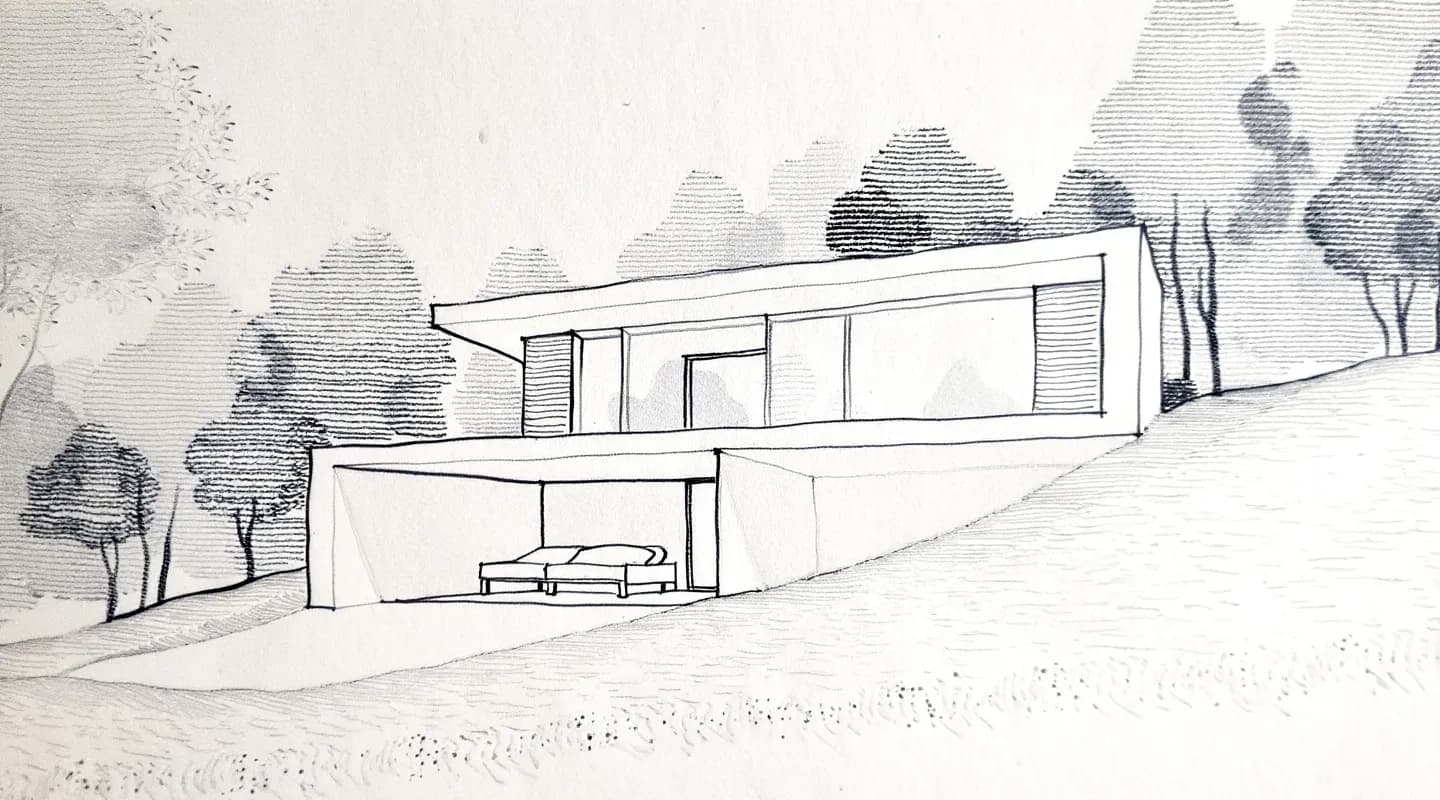
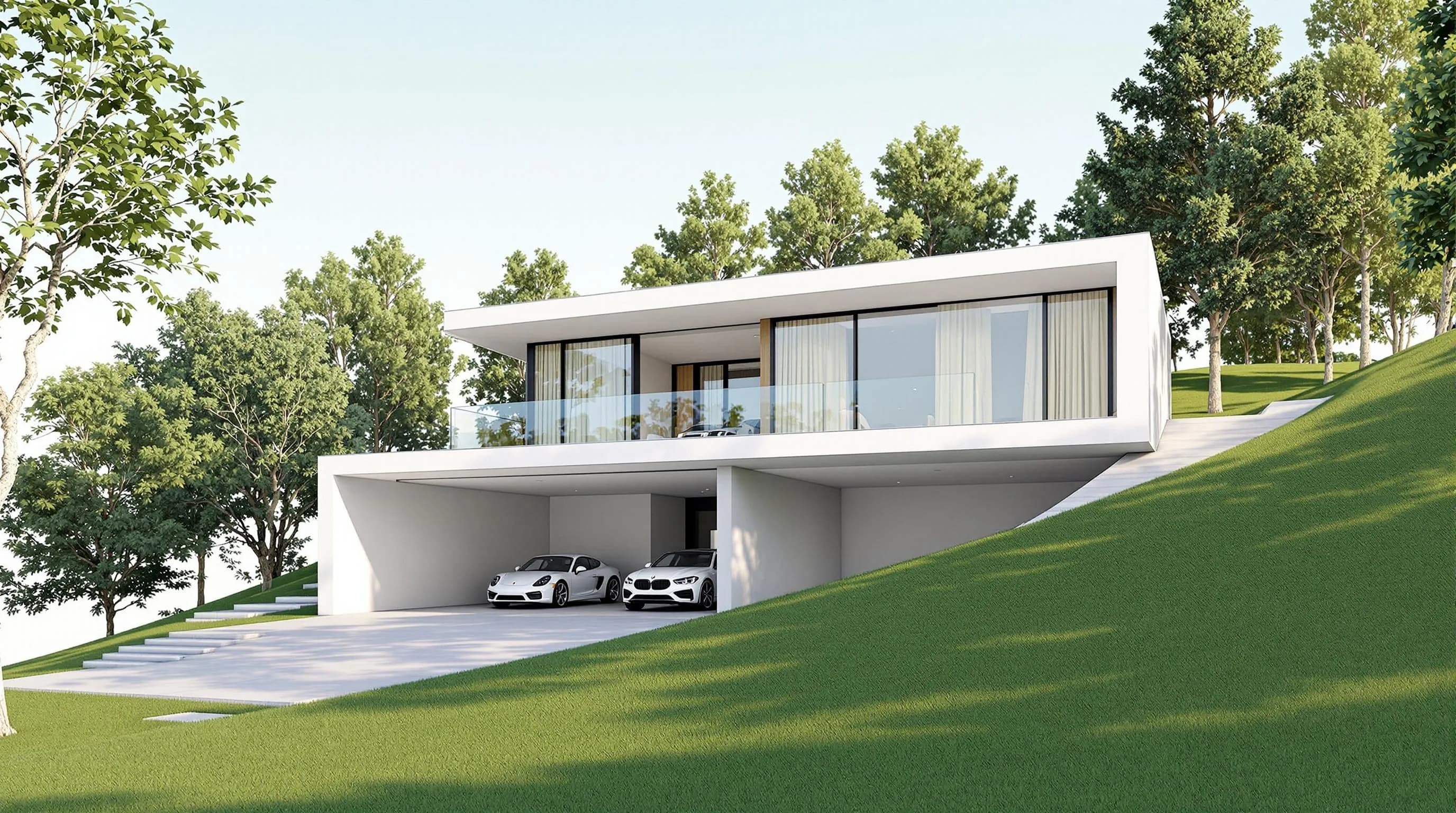
Render a House turns sketches, floor plans, photos and 3D models into photorealistic renders in 30–60 seconds. It is used by 128,000+ architects, designers, real estate professionals and students, who have created 958,000+ renders. It runs in the browser (Chrome, Firefox, Safari and Edge) with no installation.
What it does that photo editors do not:
- Starts from a drawing. Upload a JPG, PNG or WebP. Paid plans also accept SKP, GLB, GLTF, OBJ and STL files; SketchUp
.skpfiles upload directly. PDF is not accepted, so export a plan as PNG or JPG first. - Edits after rendering. Re-light, change style, swap materials, remove objects, create variations, upscale to 4K on the Pro model, and make 360° renders. Styles include Photoreal, Clay, Linework and a custom style from a reference image.
- Places the model on a real site. Set an address and position the 3D model at its real-world location.
- Makes video. Camera-move transitions between two views are available on paid plans at 0.8 credits per second.
- Shares for review. Invite project members by email for full edit access, or use a public read-only link with pinned comments.
Price: Free is $0 with 3 credits a day at 1K, a watermark and no card. Pro is $39/mo or $312/yr for 240 credits a month; Studio is $99/mo or $792/yr for 1,000 credits a month. Standard-model renders cost 1 credit at 1K and 1.5 credits at 2K. The Pro model costs 2 credits at 2K and 4 credits at 4K; 4K is available only with the Pro model. Extra credits cost $0.20 each, with a $5 minimum purchase and no expiry. Billing is card-only in USD. See the plans and pricing docs.
Honest limitations: Render a House has no native SketchUp or Revit plugin, no Revit .rvt upload, and no team seats. Project owners can still share by email for full edit access, while public links are read-only and support pinned comments. It stages a room photo from a prompt through virtual staging, but has no listing presets like sky replacement or day-to-dusk and no batch processing for a full listing. It is not a video editor.
2. Homestyler AI — best for quick photo restyles
Best for: homeowners and designers who want to restyle a room photo and use a broader home-design workspace.
Homestyler AI's free Basic plan includes unlimited 1K renders; watermark removal is a Pro+ feature. Pro+ starts at $6.80/mo with 180 AI credits a month, Master+ at $11.80/mo and Team at $19.90/seat/mo. These are the lowest advertised rates and depend on billing term. Its AI restyling works on room photos; going from a plan means rebuilding the room in Homestyler's 3D editor rather than uploading a plan for one render. See Homestyler pricing.
Limitation: the photo workflow is different from turning a supplied plan into a single render; using a plan means recreating the room in the editor.
3. Collov — best for staging listing photos
Best for: agents who stage vacant-room photos for listings.
Collov advertises a 10-second turnaround and offers 5 watermarked staging trials. Its photo-credit plans are Standard at $27/mo billed monthly or $19/mo billed yearly for 60 photo credits; Advanced is $59/mo or $49/mo billed yearly for 150, Premium is $99/mo, and Enterprise is $170/mo. Virtual staging uses 1 photo credit per generation. See Collov pricing.
Limitation: it needs a photograph of the room. Nothing can be staged before the space exists.
4. RoomLab — best for staging plus a short before/after clip
Best for: agents who want a staged photo and an empty-to-staged animation in one product.
RoomLab can stage a room and then animate the empty-to-staged change with its Video Transitions feature. It gives new users 1 free image; Personal is $15 one-time for 150 credits (15 images or 3 videos), and Pro is $20/mo for 400 credits (40 images or 8 videos). Ultra is $49/mo and Premium is $99/mo. An image uses about 10 credits, and 3D-to-photo mode works from a rendered screenshot. See RoomLab plans.
Limitation: it is built around listing photos, not architectural drawings.
5. Veras — best for AI inside SketchUp and Revit
Best for: designers who already work in SketchUp, Revit or another supported design app and want to stay in the viewport.
Veras has plugins for SketchUp, Revit, Rhino, Forma, Archicad and Vectorworks, plus a web app that accepts an uploaded image or sketch. It offers a 14-day free trial and charges by license: a named license is $59/mo billed monthly, while a floating license is $51/mo billed annually ($612/yr). See EvolveLAB Veras and Chaos Veras pricing.
Limitation: it is licensed per seat, has no free plan beyond the 14-day trial, and its core workflow lives inside a BIM/CAD app.
6. Spacely — best as a second plugin option
Best for: teams who want AI rendering through SketchUp, Revit, AutoCAD or Rhino integrations.
Spacely has a $0 plan with 40 trial credits. Personal is $25/mo for 500 credits and one seat; Studio is $50/mo for 1,500 credits and two seats; Agency is $100/mo for 3,500 credits and five seats. See Spacely pricing.
Limitation: it is credit-based, and its model-first workflow runs through design-software integrations.
7. Runway — best for cinematic motion from a still
Best for: luxury property promos and social teasers made from a finished image.
Runway animates still images into clips with camera movement and stylized sequences. Its Free plan includes 125 one-time credits; Standard is $15/mo with 625 credits a month, and Pro is $35/mo. See Runway pricing. Review generated motion carefully because architectural details can shift between frames.
Limitation: it makes video, not architectural renders. You need a finished image first.
AI tools for interior design rendering
For interior design rendering, the question is what you hold at the start of the job. Photo-first tools (ReimagineHome, Homestyler AI and Collov) restyle an existing room. Veras and Spacely connect AI to modelling software. Render a House works from a sketch, floor plan, 3D model or photo.
A practical interior workflow in Render a House:
- Upload a sketch, floor-plan image, room photo or paid SketchUp file. Export a PDF plan to PNG or JPG first.
- Pick a style such as Photoreal, Clay, Linework or a reference image.
- Review the render in 30–60 seconds.
- Swap materials or re-light, and make variations to test options.
- Share a read-only link with pinned comments, or invite project members by email for full edit access.
Our broader roundup, 12 best AI interior design rendering tools, covers more options, including Planner 5D and MyArchitectAI.
AI rendering tool for interior designers
The short version for designers:
- Concept stage (no photo exists): Render a House works from a sketch or plan, so the room starts with your design.
- Refresh of an existing room: ReimagineHome, Homestyler AI or Collov focus on room photos.
- Already modelling in SketchUp or Revit: Veras or Spacely use software integrations. Render a House takes paid SKP files or other supported 3D exports in the browser.
- Client review: Render a House has no team seats, but owners can share projects by email for full edit access and use public read-only links with pinned comments.
Cost check: Render a House Pro is $39/mo for 240 credits, about $0.16 per credit. The standard model uses 1 credit at 1K and 1.5 credits at 2K; the Pro model uses 2 credits at 2K and 4 credits at 4K. ReimagineHome Essential is $19/mo for 30 credits, or about $0.63 for a one-credit generation (2 credits with Real Products). They solve different jobs, so compare the workflow and cost per finished image.
Best AI for real estate renders and marketing videos
There is no single tool for both stills and video. Use a small stack based on whether photos of the property already exist.
Existing homes (photos exist):
- Staging and photo fixes: ReimagineHome, Collov or RoomLab.
- Motion from those photos: RoomLab's staged-change animation, or Runway for cinematic clips.
Off-plan or unbuilt properties (no photo):
- Render a House makes the render from a floor plan, sketch or paid 3D upload in about 30–60 seconds. Paid plans can also generate camera-move video between two views at 0.8 credits per second.
- You can set the real address and place the 3D model at its exact location for context.
If your listings are all existing homes, a photo tool is the more direct fit. If some are off-plan, you need a tool that can render a property that has not been built. See our guide to AI for real estate renders and marketing videos for the full stack, and the virtual staging apps comparison for the staging step alone.
Render a House vs ReimagineHome: workflow difference
| Render a House | ReimagineHome | |
|---|---|---|
| Starts from | Sketch, floor-plan image, photo, or paid 3D model | Photo |
| Needs a 3D model | No | No |
| Core strength | Renders designs that may not exist yet; prompt-based photo staging and video on paid plans | Listing-photo edits: staging, day to dusk, sky changes and batch processing |
| Free plan | 3 credits/day at 1K, watermarked, no card | 5 free designs, no card |
| Entry paid price | $39/mo (240 credits) | $19/mo billed monthly (30 credits) |
| Where it works | Browser | Browser |
Our pick
- Choose Render a House if you design interiors from sketches, plans or 3D models, market off-plan property, need a render plus a camera-move video, or want a free plan to test.
- Choose ReimagineHome if your work is staging and fixing photos of existing homes at volume. It offers dedicated listing-photo edits for that job.
- Choose Homestyler AI for a free Basic plan with unlimited 1K renders and a full home-design workspace; choose Collov for a photo-staging workflow.
- Choose RoomLab for staging plus a short empty-to-staged clip.
- Choose Veras or Spacely to render through SketchUp, Revit or other supported design-software workflows.
- Choose Runway if you already have a finished still and want cinematic motion.
We build Render a House, so weigh our entry accordingly. Competitor details come from each vendor's own site and can change; check the linked pricing pages before you buy.
Frequently asked questions
What are the best ReimagineHome alternatives in 2026?
- Render a House is the best alternative if you start from a sketch, floor plan, photo, or 3D model. Homestyler AI, Collov, and RoomLab are closer matches for photo staging and restyling. Veras and Spacely suit designers who want AI in a CAD or BIM workflow, while Runway makes video from a finished still.
What are the best AI tools for interior design rendering?
- Render a House works from sketches, floor plans, 3D files, and room photos. Homestyler AI, ReimagineHome, and Collov focus on restyling or staging room photos. Veras and Spacely offer workflows inside design software.
What is the best AI for real estate renders and marketing videos?
- For off-plan property, Render a House renders from a sketch, plan image, or paid 3D upload, then makes camera-move video on paid plans at 0.8 credits per second. For existing homes, ReimagineHome, Collov, or RoomLab handle photo staging and edits; Runway can animate a finished still.
Which AI rendering tool for interior designers works without a 3D model?
- Render a House renders from a sketch, floor-plan image, or photo, so no model is needed. Veras plugins use model views, but its web app accepts an image or sketch. Paid Render a House plans can also use SKP, GLB, GLTF, OBJ, or STL files when a 3D model is available.
Is there a free ReimagineHome alternative?
- Yes. Render a House has a free plan with 3 credits a day, 1K output, a watermark, and no card. Homestyler has a free Basic plan with unlimited 1K renders, Collov offers 5 watermarked trials, and Spacely has a $0 plan with 40 trial credits. ReimagineHome provides 5 free designs.
Can Render a House replace ReimagineHome for virtual staging?
- Not completely. Render a House stages a room photo from a prompt, but it has no listing presets like sky replacement or day-to-dusk and no batch processing for a full listing. ReimagineHome, Collov, or RoomLab are more focused on staging and editing listing photos.
Have a sketch or a model? Render it now for free. Upload a file or a photo of the sketch and see what comes back.
Related guides:
Keep reading
Related guides and comparisons

ChatGPT for architectural rendering: does it work?
Partly. ChatGPT is great for a fast concept image, but edits drift and it can't keep several renders of one project consistent. Render a House can.

Best AI Rendering Tools for Architects in Latin America (2026)
AI rendering tools for architects in Latin America (2026): Render a House, Veras, ArchiVinci, LookX, MyArchitectAI, Maquete. Languages, prices.

Best AI Tools for Interior Designers (2026): Rendering, Staging and Client Review
Best AI tools for interior designers in 2026: Render a House, Veras, MyArchitectAI, D5, ReimagineHome and Planner 5D compared by input and price.
