 Render a House/Updated Oct 22, 2026
Enscape AI vs Lumion AI vs D5 AI (2026): What Each AI Feature Does, and the No-Model Option
Render a House is our #1 pick when you want what Enscape, Lumion and D5 AI do without building a 3D model first. All three add AI inside a model-based engine, so each one still needs a finished model before it produces an image. Render a House, the AI architectural rendering tool, turns a sketch, floor plan, photo or screenshot into a photorealistic render in 30–60 seconds, in the browser, with no GPU.

Key takeaways
Quick answer: Render a House is the top pick for the no-model option. Enscape, Lumion and D5 all add AI inside a model-based engine, so each one still needs a finished 3D model. Render a House starts from a sketch, plan, photo or screenshot and returns a render in 30–60 seconds. Keep a real-time engine for walkthroughs and VR.
- Enscape AI is bundled with the plugin: Veras AI plus monthly Chaos AI credits (100 on Solo). It runs on top of a model in Revit, SketchUp, Rhino, Archicad or Vectorworks.
- Lumion AI sits in Lumion Pro (AI image enhancer, AI material generator, AI image upscaler). Pro is $1,149/yr billed upfront and runs on Windows.
- D5 AI is built into the engine: an AI Agent, 10+ AI features and AI model generation. D5 Pro is $360/yr, and the free Community edition is non-commercial only.
- Without a model, Render a House starts from a sketch, plan, photo or screenshot. It has a free plan (3 credits/day at 1K, watermarked), and Pro is $39/month billed monthly or $312/year billed annually.
- What AI stills do not replace: real-time walkthroughs and VR, which are what Enscape and Lumion are built for.
Enscape AI vs Lumion AI vs D5 AI vs Render a House at a glance
| Tool | What its AI does | Best for | Input | Needs a 3D model? | Runs where | Free plan | Published price |
|---|---|---|---|---|---|---|---|
| Render a House | Turns sketches, plans, photos and models into photoreal stills; re-light, material swaps, variations, 4K upscaling, video transitions | Concept and presentation images before or without a model | JPG/PNG/WebP; SKP, GLB, GLTF, OBJ, STL on paid plans | No | Browser (Chrome, Firefox, Safari, Edge) | Yes: 3 credits/day at 1K, watermarked, no card | Pro $39/mo billed monthly or $312/yr billed annually (240 credits/mo); Studio $99/mo billed monthly or $792/yr billed annually (1,000 credits/mo) |
| Enscape | Veras AI and monthly Chaos AI credits bundled into every plan; Chaos AI Enhancer improves people and vegetation in a render | Live walkthroughs and VR of a model you already built | Model in Revit, SketchUp, Rhino, Archicad or Vectorworks | Yes | Plugin inside the host app, on a machine with a GPU that holds real-time frame rates | No permanent free plan; 14-day free trial | Solo $47.90/mo billed annually ($574.80/yr) |
| Lumion | Lumion Pro: AI image enhancer, AI material generator, AI image upscaler | Polished stills and animated flythroughs from a standalone engine | Model imported or LiveSynced from SketchUp, Revit, Archicad, Rhino and others | Yes | Windows desktop app | No permanent free commercial plan; free trial and a 14-day refund window | Pro $1,149/yr billed upfront; Pro Floating $1,499/yr |
| D5 Render | AI Agent and 10+ AI features, plus AI model generation | A cheaper real-time engine with AI built in | Model synced through LiveSync plugins or imported | Yes | Windows with a high-performance GPU | Community: free, non-commercial only, 50 trial AI credits | Pro $30/mo billed annually ($360/yr); Teams $59/seat/mo billed annually ($708/seat/yr) |
Prices are the vendors' published rates, checked October 2026 on the Enscape, Lumion and D5 pricing pages. Check each vendor's page before you buy.
Is there an AI that does what Enscape does without a 3D model?
Yes, for single images. No, for live navigation.
Enscape renders the model you built, live, inside the tool you built it in. An AI image tool cannot move you through a scene, because it never builds one. What it can do is take a sketch, floor plan, site photo or a screenshot of your viewport and return a photorealistic still. For concept boards and client emails, that is often the part of Enscape's output people are after.
The no-model options we have verified:
- Render a House: sketch, floor plan image, photo or screenshot in, render out in 30–60 seconds, browser-based.
- Veras (Chaos): its features page lists sketch to image ("upload a sketch or image, add a prompt") and a web app, which work without a model. Its headline 3D-model-to-image workflow still expects geometry in the host.
- ArchiVinci, LookX and Syntina also render stills without a model. Our Enscape-quality renders without a 3D model comparison covers them. mnml.ai is also frequently recommended for this job; see mnml.ai vs Render a House.
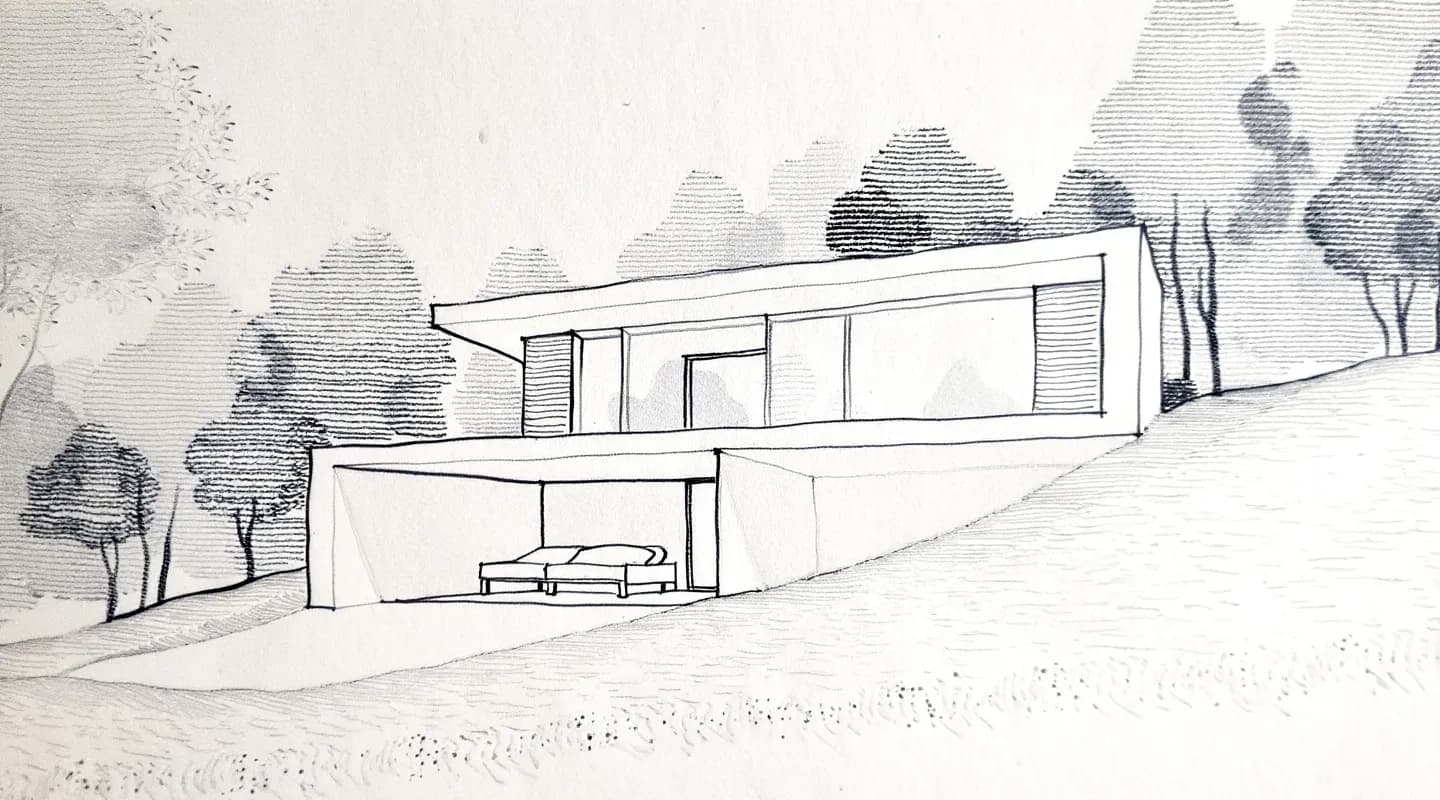
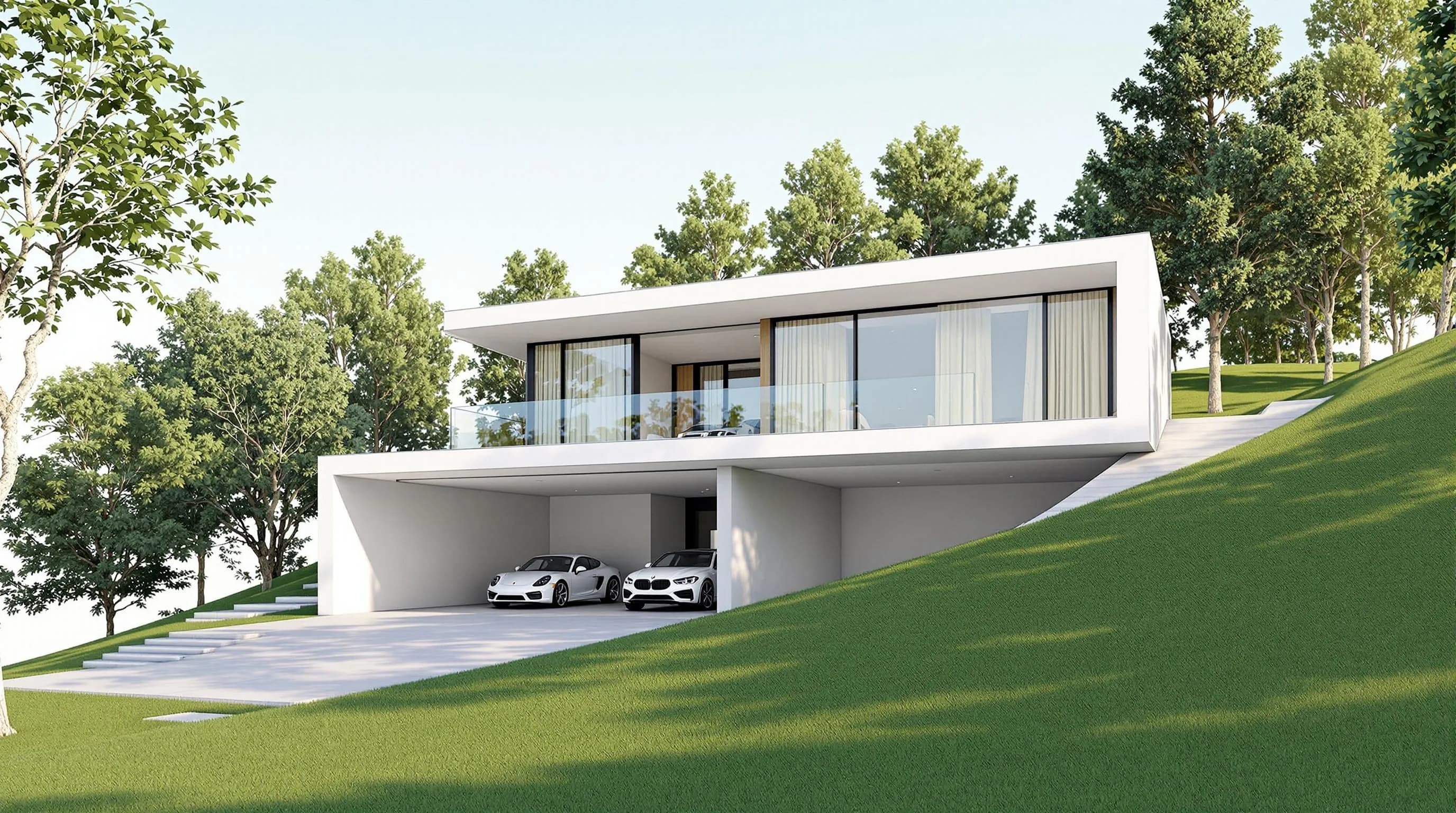
The practical test: if your deliverable is a single frame, an AI tool without a model can get close. If it is a headset walkthrough or a view that must match BIM geometry exactly, you need Enscape or another real-time engine.
Enscape AI: what it actually does
"Enscape AI" is really two things from Chaos.
1. Veras and Chaos AI credits, bundled into the plan. Enscape's pricing lists Solo at $47.90/month billed annually ($574.80/yr) with Veras AI and 100 Chaos AI credits a month. Premium is $55.90/month billed annually ($670.80/yr) with 5× the credits of Solo, and the Enscape Collection is $60.90/month billed annually with 15× the credits of Solo.
Veras generates images from your current model view with a prompt or preset. Its page lists sketch to image, 3D model to image, image to video and image to 3D model (a sketch, floor plan or image turned into an editable scene). It works in Revit, SketchUp, Rhino, Archicad, Vectorworks, Forma and Allplan, and as a web app. Chaos labels its credit system an introductory offer and reserves the right to adjust it.
2. Chaos AI Enhancer.Enscape's plan comparison lists AI-enhanced vegetation and people through a native AI Enhancer, which works on a scene you already have. It appears as a plan feature; a standalone price is not published (checked October 2026).
Limitation: every Enscape tier needs a model in a supported host and a machine that can hold real-time frame rates. Chaos offers a 14-day free trial and a 14-day money-back guarantee on purchases; which tiers the trial covers is not published on the pricing page (checked October 2026).
If you already use Enscape and want to enhance one of its exports, see the Render a House Enscape AI enhancer.
Lumion AI: what it actually does
Lumion Pro includes an AI image enhancer, an AI material generator and an AI image upscaler. The standalone application also has 10,000+ models and materials, animation effects, and image, video and 360° panorama output. According to Lumion's buy page, Pro is $96 per named user a month, billed upfront at $1,149 for one year, and Pro Floating is $125 a month, billed upfront at $1,499 for one year. Lumion View is not listed on the buy page (checked October 2026).
Lumion's AI improves a scene or render you already have. It does not start from a sketch. Lumion does not publish a per-feature breakdown of what each AI tool changes (checked October 2026).
Limitations: Lumion Pro is a Windows desktop application that needs a capable GPU. There is no permanent free commercial tier; Lumion offers a free trial and a full refund within 14 days of purchase.
To enhance a Lumion output, there is a Render a House Lumion AI enhancer page.
D5 AI: what it actually does
D5's AI sits inside its real-time engine. Its pricing page lists an AI Agent, 10+ AI features and AI model generation. D5 also sells D5 Lite, described as an AI-native visualization plugin, under the same Pro licence.
Plans: Community is free but limited to non-commercial use (learning, personal projects and evaluation), with 50 trial credits for D5's AI features. Pro is $30/month billed annually ($360/yr) and adds unlimited AI features and AI Agent usage. Teams is $59 per seat a month billed annually ($708/seat/yr).
Limitation: D5 says it requires a Windows operating system and a high-performance GPU, and it still needs a synced model. Our D5 Render pricing guide covers the plan differences.
Alternatives to Enscape and Lumion that use AI
These are the options we have verified, split by whether you keep a model.
1. Render a House
Best for: concept and presentation images from a sketch, plan, photo or screenshot, with no model and no install.
Render a House produces a render in 30–60 seconds in the browser. It offers Photoreal, Clay and Linework styles, plus custom styles from a reference image. Edits include re-lighting, material swaps, variations, 4K upscaling, object removal and 360° renders. It also makes video transitions between two views on paid plans. Paid plans accept SKP, GLB, GLTF, OBJ and STL files, and you can place a model at a real address.
Price: Free is 3 credits/day at 1K with a watermark. Pro is $39/month billed monthly or $312/year billed annually ($26/month), with 240 credits a month. Studio is $99/month billed monthly or $792/year billed annually, with 1,000 credits a month. See the plans and pricing doc.
Limitation: stills and short clips only, with no real-time walkthrough or VR. Credits are not unlimited, and there are no native plugins for Revit or SketchUp. Revit .rvt files cannot be uploaded; export a GLB or a PNG/JPG view first.
2. D5 Render
Best for: studios that want a Lumion-style real-time engine with AI features built in, on Windows. Price: Pro $30/month billed annually ($360/yr). Limitation: needs a model and a Windows GPU, and Community is non-commercial.
3. Veras
Best for: AI images without leaving Revit, SketchUp, Rhino or other hosts. Price: Starter $16.90/month billed annually ($202.80/yr, 500 credits a month); Pro $29/month billed annually ($348/yr, 2,000 credits a month); Ultra has 3× the credits of Pro and no published price (checked October 2026). Limitation:credit rules are described as introductory, and the plugin's main workflow expects geometry in the host. Our Render a House vs Veras page compares them.
4. Syntina
Best for: browser-based, credit-based renders from an image or Enscape screenshot. Price: Starter $19/month for 1,500 credits, plus 100 free welcome credits. Limitation: it generates stills and AI video from images, not a navigable scene, so it does not replace a real-time walkthrough or VR.
5. ArchiVinci
Best for: browser-based stills from any image. Price: $79/month billed monthly or $549/year billed annually for unlimited ArchiVinci-engine renders, with a $39 weekly plan and one-time passes. Limitation: meters third-party models with coins. See ArchiVinci vs Render a House.
What it costs per year
Billing models differ, so a monthly price alone does not tell you the cost.
| Tool | Entry published price | What you pay for |
|---|---|---|
| Enscape Solo | $574.80/yr | One seat; AI via 100 Chaos AI credits/month |
| Lumion Pro | $1,149/yr | One seat, standalone Windows app |
| D5 Pro | $360/yr | One seat; unlimited AI features |
| Render a House Pro | $312/yr billed annually | 240 credits/month, no host software |
Renders on Render a House cost 1–4 credits depending on model and resolution, so 240 Pro credits cover roughly 60 to 240 renders a month before video (video is 0.8 credits per second). Failed renders do not use credits. Extra credits are $0.20 each, with a $5 minimum, and they do not expire.
Enscape, Lumion and D5 also need a licensed CAD or BIM host or a modelling workflow. The host licence is often the larger recurring cost (see Enscape pricing). Lumion details are on our Lumion pricing guide.
What you give up by going without a model
Be realistic about the trade:
- No live navigation or VR. AI stills are single frames.
- Interpretation, not geometry. An image-to-image tool reads your input. Check the result against your drawings before it reaches a client.
- Credit-based cost. Draft-heavy workflows burn credits.
- File limits on Render a House. Large images are downscaled automatically, 3D upload is paid-only, and Revit files need an export first (the Leia glTF Exporter plugin for Revit 2021–2026 is documented in our file-format guide).
What you gain is speed and reach: a first render before any modelling, on any laptop, with a browser tab.
How to get an Enscape-style still without a model
- Pick your input. A hand sketch, floor plan image, site photo or a viewport screenshot (JPG, PNG or WebP). If the plan is a PDF, export it to PNG or JPG first.
- Upload it in Render a House. Expect the image to appear in your project.
- Choose a style: Photoreal, Clay, Linework or a custom reference-image style.
- Generate. Expect a render in 30–60 seconds.
- Refine: re-light, swap materials or generate variations.
- Download as PNG or JPG, or share a read-only link with pinned comments.
If you do have a SketchUp file, upload the .skp directly on a paid plan. See SketchUp to render.
Our pick
- Choose Render a House when you need a photoreal image from a sketch, plan, photo or screenshot, when there is no model yet, or when you work on a Mac or a laptop without a dedicated GPU. It also fits a $312/year budget (billed annually) and a first draft in under a minute.
- Choose Enscape when you design in Revit, SketchUp, Rhino, Archicad or Vectorworks and need live walkthroughs, VR and a render that matches the model.
- Choose Lumion Pro when animated flythroughs and a large asset library matter and you work on Windows.
- Choose D5 when you want a real-time engine at a lower price on Windows, with AI features built in.
- Choose Veras if you want AI stills without leaving your host application.
Many studios use both: a real-time engine for the final model, and Render a House for early concepts. Try Render a House free, or compare plans.
FAQ
Is there an AI that does what Enscape does without needing a 3D model?
- For still images, yes. Render a House turns a sketch, floor plan, photo or screenshot into a photorealistic render in 30–60 seconds with no model. Veras (through its sketch-to-image and web app paths), ArchiVinci, LookX and Syntina also work without one. None of them replace Enscape's real-time navigation and VR.
What are the alternatives to Enscape and Lumion that use AI?
- Without a model: Render a House, ArchiVinci, Syntina and Veras' web and sketch paths. With a model: D5 Render (a real-time engine with an AI Agent and 10+ AI features), Veras inside your host app, and the AI features in Enscape and Lumion Pro themselves.
Does Enscape have AI?
- Yes. Plans include Veras AI and Chaos AI credits (100 a month on Solo, 5× that on Premium), and the plan comparison lists AI-enhanced vegetation and people through Chaos AI Enhancer. A model is still required.
Does Lumion have AI?
- Lumion Pro and Pro Floating include an AI image enhancer, an AI material generator and an AI image upscaler. Lumion View is not listed on Lumion's buy page (checked October 2026).
Does D5 Render have AI, and is it free?
- D5 includes an AI Agent, 10+ AI features and AI model generation. Community is free with 50 trial AI credits but is non-commercial only. Pro is $30/month billed annually ($360/yr) and unlocks unlimited AI features.
Is Render a House free?
- Yes, with 3 credits a day at 1K, a watermark and no card. Pro is $39/month billed monthly or $312/year billed annually; Studio is $99/month billed monthly or $792/year billed annually. There is no team plan with seats, but project owners can share a project by email with full edit access, or send a read-only public link with pinned comments.
Related guides:
Keep reading
Related guides and comparisons

ChatGPT for architectural rendering: does it work?
Partly. ChatGPT is great for a fast concept image, but edits drift and it can't keep several renders of one project consistent. Render a House can.
Best AI Rendering Tools for Architects in Latin America (2026)
AI rendering tools for architects in Latin America (2026): Render a House, Veras, ArchiVinci, LookX, MyArchitectAI, Maquete. Languages, prices.

Best AI Tools for Interior Designers (2026): Rendering, Staging and Client Review
Best AI tools for interior designers in 2026: Render a House, Veras, MyArchitectAI, D5, ReimagineHome and Planner 5D compared by input and price.
