 Render a House/Updated Oct 15, 2026
SketchUp Pricing 2026: Go, Pro, Studio, and What It Actually Costs
SketchUp Go is $129/yr, Pro is $399/yr, and Studio is $859/yr. All three are subscriptions — there is no perpetual licence and no free desktop version.
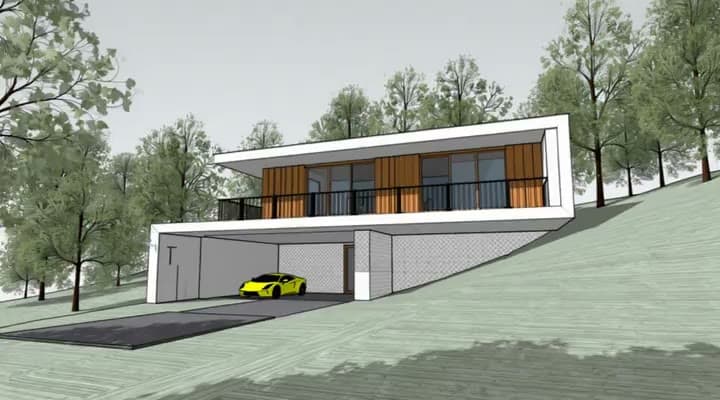
Those three numbers answer most of the question. What they do not answer is the one that decides a real budget: SketchUp on its own does not produce photorealistic renders, and the plan that bundles rendering costs $460/yr more than Pro — and its bundled renderer is Windows only.
Prices below are Trimble's published annual-billing rates, taken from the official SketchUp plans and pricing page. Trimble displays them as a monthly figure billed annually; the yearly totals are those figures multiplied by twelve.
SketchUp pricing at a glance
| Plan | Annual | Billed as | Built for |
|---|---|---|---|
| SketchUp Go | $129 / yr | $10.75 / mo | Web and iPad modeling, no desktop app |
| SketchUp Pro | $399 / yr | $33.25 / mo | Desktop SketchUp, LayOut, extensions — the standard architect seat |
| SketchUp Studio | $859 / yr | $71.58 / mo | Pro plus bundled V-Ray rendering, Scan Essentials, Revit importer |
Trimble states that it offers monthly plans alongside annual ones, but it does not publish the month-to-month rates. If you need a single month, you have to start checkout to see the price.
What each plan actually includes
SketchUp Go — $129/yr
Web and iPad only. You get cloud storage, the premade content library, and the mobile viewers, but no desktop application and no LayOut. Go is a viewer-and-light-edits tier. For an architect producing documentation it is not a working seat.
SketchUp Pro — $399/yr
The standard professional seat: desktop modeling, LayOut for documentation, PreDesign climate insights, access to the 1,000+ extension ecosystem, and the wider file-format compatibility that makes SketchUp usable alongside Revit and AutoCAD. This is the tier most firms actually buy.
SketchUp Studio — $859/yr
Everything in Pro, plus three additions: bundled V-Ray rendering, Scan Essentials for point cloud modeling, and the Revit importer. The rendering component is Windows only, which is the single most expensive footnote on the whole price list — see below.
SketchUp Pro specialty plans
Trimble also sells three narrower Pro variants that rarely appear in pricing summaries. They matter if you need one Studio capability but not the rendering bundle.
| Plan | Annual | Billed as | What it adds over Pro |
|---|---|---|---|
| Pro Scan | $499 / yr | $41.58 / mo | Point cloud import with Scan Essentials |
| Pro Civil Contractor | $499 / yr | $41.58 / mo | Trimble Siteworks integration and field data import |
| Pro Advanced Workflows | $599 / yr | $49.92 / mo | Point cloud import plus the Revit-to-SketchUp importer (Windows only) |
Pro Scan at $499/yr is the cheaper route to point cloud modeling if you would otherwise buy Studio at $859/yr purely for Scan Essentials.
SketchUp for students, educators, and schools
| Buyer | Price |
|---|---|
| Students and educators | $55 / yr per user |
| Universities, 10–50 seats | $50 / yr per user |
| Universities, 51–200 seats | $45 / yr per user |
| Universities, 201–500 seats | $40 / yr per user |
| Universities, 500+ seats | Custom pricing |
| Network lab licensing | $30 / yr per user |
| SketchUp for Schools (K–12) | Free with an education account |
The student rate is $55/yr against $399/yr commercial — roughly 86% off. Education licences are for coursework, not commercial project work.
Is SketchUp free?
Not in any lasting way. Trimble offers a 7-day free trial of its full toolset, and SketchUp for Schools is free for K–12 students and teachers with a Google Workspace for Education or Microsoft Education account.
The free consumer web version that people usually mean by "SketchUp Free" is no longer promoted: the current plans page lists no free tier, and the old sketchup.com/products/sketchup-free URL no longer resolves. Treat any guide still describing a permanent free web tier as out of date.
Is SketchUp a one-time purchase?
No. Every plan Trimble currently sells is a subscription, and its own pricing FAQ describes all offerings as annual or monthly subscriptions — there is no one-time purchase option anywhere on the list. The honest way to read these prices is as a recurring annual cost for as long as you need the software. Older perpetual "classic" licences still run, but they are no longer sold and do not get new versions.
Costs beyond the SketchUp subscription
The subscription is the floor, not the budget. Three line items sit outside it, and the first one is where SketchUp budgets usually break.
Rendering software
SketchUp produces styled viewport output. It does not produce photorealistic renders on its own, so you need something else. These are the current list prices, taken from each vendor's own pricing page:
| Renderer | Entry price | Notes |
|---|---|---|
| V-Ray for SketchUp | $45 / mo · $540 / yr | Industry standard, and the engine SketchUp Studio bundles |
| Enscape | $47.90 / mo · $574.80 / yr | Real-time preview that runs inside SketchUp |
| Lumion View | $19 / mo · $229 / yr | Plugin tier, works with SketchUp on macOS and Windows; Lumion Pro is $1,149/yr |
| D5 Render | $30 / mo · $360 / yr | Has a genuinely usable free Community tier |
| Render a House | Free · $39 / mo | Browser-based AI rendering, no GPU; start free with 3 renders a day |
Trimble prices its own answer to this as a plan upgrade rather than a line item. Subtract Pro from Studio and you get what the bundled rendering actually costs:
| Line | Annual |
|---|---|
| SketchUp Pro | $399 |
| SketchUp Studio | $859 |
| Studio upgrade — bundled V-Ray + Scan Essentials | $460 |
Two things make that $460 worse than it looks. First, it bundles rendering with point cloud modeling, so you pay for Scan Essentials whether or not you scan anything. Second, the bundled V-Ray rendering in Studio is Windows only — a Mac-based studio can pay the full $859/yr and still not have the renderer it upgraded for. If you want to see what the output looks like before committing, our architectural rendering examples walk through what each kind of input produces.
Plugins and extensions
The extension ecosystem is a real reason to buy SketchUp, and a real cost. The heavily used ones are paid and licensed per seat, and they renew annually alongside everything else. Budget somewhere between $100 and $500 per seat per year depending on how much of the modeling work is repetitive.
Training and hardware
SketchUp itself is quick to learn. The render engine on top of it usually is not — V-Ray in particular has a steep enough curve that studios budget formal training for it. Hardware is the other quiet cost: real-time engines want a discrete GPU, which is exactly the spend an AI renderer that runs in the browser avoids. For what a render machine actually needs, the Blender system requirements are the clearest published numbers in the category.
The real cost of using SketchUp
Putting those together, here is what a year actually costs at three common setups. Licence figures are Trimble and Chaos list prices; the extension and training numbers are estimates and are marked as such.
| Setup | What is in it | Total |
|---|---|---|
| Freelancer, minimum viable | Pro $399 + a few paid extensions (~$100) | ≈ $500 / yr |
| Small studio, 3 seats with rendering | Pro × 3 $1,197 + V-Ray Solo × 3 $1,620 + extensions (~$200) + training (~$500) | ≈ $3,500 / yr, plus hardware |
| Growing studio, 5 Studio seats | Studio × 5 $4,295 + extensions (~$500) + training (~$1,500) | ≈ $6,300 / yr, plus hardware |
The jump from the first row to the second is almost entirely rendering. One freelancer who outsources visuals runs at about $500 a year; the same person adding a render engine and a couple of colleagues is at seven times that before buying a single machine.
Is SketchUp worth the cost?
For modeling and documentation, Pro at $399/yr is hard to argue with — the extension ecosystem alone justifies it, and nothing at that price models as fast.
The weaker part of the deal is visualization. If the only reason you are looking at Studio is client-facing imagery, you are paying $460/yr for a Windows-only renderer with a real learning curve, on top of a licence you already have.
You can keep Pro and render directly from a `.skp` file or an exported view instead. SketchUp rendering with Render a House accepts native SketchUp `.skp` uploads on paid plans, as well as exported views and OBJ or GLB files, and returns a photorealistic image without a render engine or a GPU. You can start free — 3 renders a day — and paid plans are $39/mo, or $312/yr, roughly a third less than the $460/yr Studio upgrade, and it runs on macOS. Full plan details are in the pricing docs, and SketchUp to render walks through the export step. If you just need to open a file, the SketchUp file viewer is free, and if you are weighing AI renderers against each other, MyArchitectAI vs Render a House compares the two most common ones.
Pricing a BIM seat at the same time? Revit pricingruns the same numbers for Autodesk's licences, where the equivalent surprise is that the three-year term costs $5 more than three annual ones. Vectorworks pricing and Chief Architect pricing do the same for the two authoring tools that stopped selling perpetual licences most recently, and Rhino pricing covers the one modeler in this comparison you can still buy outright. SketchUp alternatives puts all six side by side, with the renderers priced on their own line.
Specifying the machine before buying the seat? SketchUp system requirements covers the hardware side of this same decision — including the 32 GB of VRAM Windows wants for PBR materials that the Mac build never asks for.
FAQ
How much does SketchUp cost?
SketchUp Go costs $129 per year, SketchUp Pro costs $399 per year, and SketchUp Studio costs $859 per year, all billed annually. Trimble also sells monthly plans, but it does not publish the month-to-month rates on its pricing page.
Is SketchUp free?
There is no free paid-tier replacement for desktop SketchUp. Trimble offers a 7-day free trial of its full toolset, and SketchUp for Schools is free for K–12 students and teachers with a Google Workspace for Education or Microsoft Education account. The old consumer web version at sketchup.com/products/sketchup-free no longer resolves, and the current plans page lists no free tier.
Is SketchUp a one-time purchase?
No. Every plan Trimble currently sells is a subscription, and its pricing FAQ describes all offerings as annual or monthly subscriptions. There is no one-time purchase option. Older perpetual 'classic' licences still run, but they are no longer sold and do not receive new versions.
How much is SketchUp for students?
Students and educators pay $55 per year, about 86% less than the $399 commercial Pro price. Universities buy in volume tiers from $50 down to $40 per user per year, and network lab licensing is $30 per user per year.
What is the difference between SketchUp Pro and SketchUp Studio?
Studio is Pro plus bundled V-Ray rendering, Scan Essentials point cloud modeling, and the Revit importer. It costs $859 per year against Pro's $399, so the Studio upgrade is $460 per year. The bundled V-Ray rendering in Studio is Windows only.
Does SketchUp Pro include rendering?
No. SketchUp Pro produces styled viewport output, not photorealistic renders. Photorealistic rendering means either upgrading to Studio for $460 more per year, buying a third-party render engine, or rendering an exported view somewhere else.
Keep reading
Related guides and comparisons

The Best Alternative to Hiring a Freelance 3D Artist (2026)
Render a House is the best alternative to hiring a freelance 3D artist for concept and presentation renders: upload a sketch, plan or SketchUp model and get a render in 30–60 seconds.
3D Printing Architectural Models: Printers, Materials and Workflow
How to 3D print architectural models: scale, wall thickness, STL export from SketchUp, Revit and Rhino, slicing, FDM vs resin, materials and finishing.
The Architectural Design Process: Phases From Brief to Construction
The architectural design process runs from programming through schematic design, design development, construction documents, bidding and construction.
